Configuring the Audit API URL and Token
After installing the app, you need to point it to your deployed Audit API backend and configure the access token.
Prerequisites
Before configuring the app, make sure you have:
- A deployed Audit API backend
- An access token from the Audit API (generated by running
python commands.py seed-superuserordocker compose exec api python commands.py seed-superuser)
Steps
- Open the DHIS2 Audit Vision app from your DHIS2 dashboard.
- Go to Settings (gear icon in the top-right corner).
- In the Audit API URL field, enter the full URL of your deployed backend.
Example:https://your-server-ip-or-domain - In the Audit API Token field, enter the access token generated by the
seed-superusercommand. - Click Save.
When you save the configuration, Audit Vision will:
- Automatically create and maintain the Audit Vision Administrators user group (if it doesn't exist)
- Automatically create and maintain all required API Routes in your DHIS2 instance (similar to how it handles SQL Views)
- Restrict access to these API Routes to only the Audit Vision Administrators user group
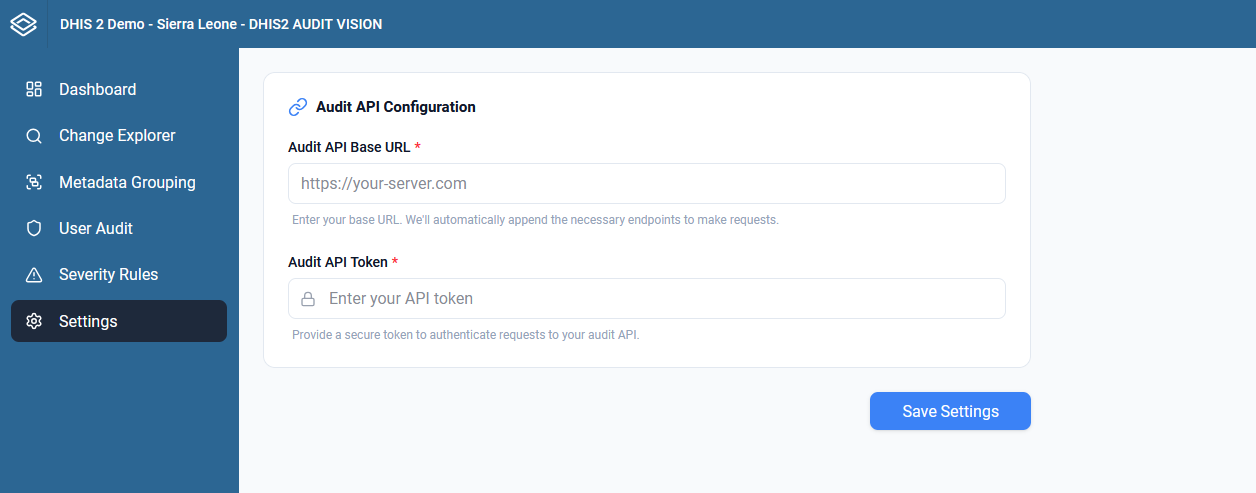
The app will now connect to your backend and begin displaying audit data.
info
Make sure the Audit API server is running and accessible from the network where your DHIS2 instance is hosted. If Nginx is configured correctly as a reverse proxy, the URL should be the server's IP or domain without a port number.
tip
If you lose your access token, you can generate a new one by re-running the seed-superuser command.